
CC BY 4.0 (除特别声明或转载文章外)
如果这篇博客帮助到你,可以请我喝一杯咖啡~
Audio course
Working with audio data
加载声音数据集
这里主要使用 Hugging Face 的 datasets 库,使用方法如下:
pip install datastes[audio]
使用 load_dataset() 函数一键下载
这里以 MINDS-14 (包含人们以几种语言和方言询问电子银行系统问题的录音。)举例
在 hub 上找到对应的 dataset, 并且只对澳大利亚子集感兴趣,并且限制划分为训练集合
from datasets import load_dataset

minds = load_dataset("PolyAI/minds14", name="en-AU", split="train")
minds
输出
Dataset(
    {
        features: [
            "path",
            "audio",
            "transcription",
            "english_transcription",
            "intent_class",
            "lang_id",
        ],
        num_rows: 654,
    }
)
这个数据集包含 654 个音频文件每一个有一个转义脚本,一个英文翻译,和一个标签对应查询意图,每一列包含原始声音数据
example = minds[0]
example
输出
{
    "path": "/root/.cache/huggingface/datasets/downloads/extracted/f14948e0e84be638dd7943ac36518a4cf3324e8b7aa331c5ab11541518e9368c/en-AU~PAY_BILL/response_4.wav",
    "audio": {
        "path": "/root/.cache/huggingface/datasets/downloads/extracted/f14948e0e84be638dd7943ac36518a4cf3324e8b7aa331c5ab11541518e9368c/en-AU~PAY_BILL/response_4.wav",
        "array": array(
            [0.0, 0.00024414, -0.00024414, ..., -0.00024414, 0.00024414, 0.0012207],
            dtype=float32,
        ),
        "sampling_rate": 8000,
    },
    "transcription": "I would like to pay my electricity bill using my card can you please assist",
    "english_transcription": "I would like to pay my electricity bill using my card can you please assist",
    "intent_class": 13,
    "lang_id": 2,
}
每一列包含几个特征:
- path:音频文件的路径
- array: 解码音频数据,用 1-维数 的 numpy 的 array表示
- sampling_rate: 采样率(8000Hz例子)
intent_class 是录音的分类类别,为了将数字转为有意义的字符 使用 int2str():
id2label = minds.features["intent_class"].int2str
id2label(example["intent_class"])
输出
"pay_bill"
如果你计划在子集训练一个声音分类器,你不需要所有特征,举例来说, lang_id 对于所有示例都具有相同的值,所以没用。English_transcription 可能会在此子集中复制转录,因此我们可以安全地删除它们。
简单使用 Hugging Face Datasets ‘remove_columns’ 删除不相干的特征
columns_to_remove = ["lang_id", "english_transcription"]
minds = minds.remove_columns(columns_to_remove)
minds
输出
Dataset({features: ["path", "audio", "transcription", "intent_class"], num_rows: 654})
现在让我们看几个例子,我们从 gradio 中使用 Blocks 和 Audio 在数据集中随机编码一些样例
import gradio as gr


def generate_audio():
    example = minds.shuffle()[0]
    audio = example["audio"]
    return (
        audio["sampling_rate"],
        audio["array"],
    ), id2label(example["intent_class"])


with gr.Blocks() as demo:
    with gr.Column():
        for _ in range(4):
            audio, label = generate_audio()
            output = gr.Audio(audio, label=label)

demo.launch(debug=True)
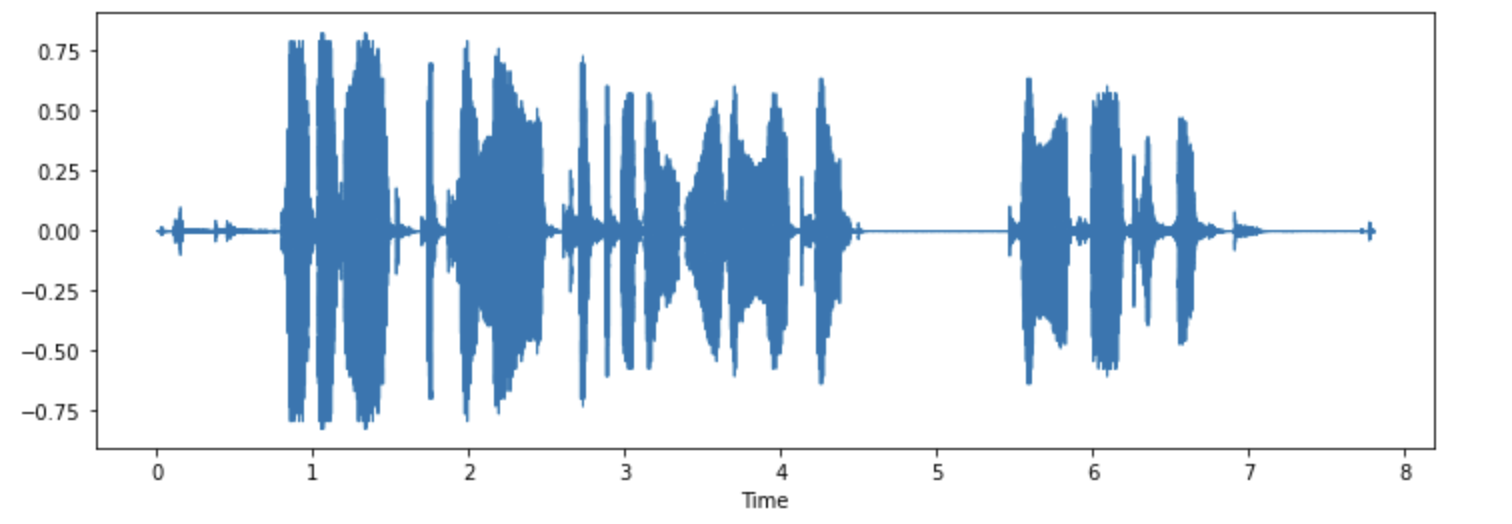
你乐意可以可视化一些列子:
import librosa
import matplotlib.pyplot as plt
import librosa.display

array = example["audio"]["array"]
sampling_rate = example["audio"]["sampling_rate"]

plt.figure().set_figwidth(12)
librosa.display.waveshow(array, sr=sampling_rate)
处理数据集
你要训练推理模型,首先得预处理数据。大概遵循以下步骤
- 重新采样数据
- 过滤
- 将声音转换模型期望输出
重采样
默认采样率一般不适用自己的,有差异的话自己重新调整
一般的预训练模型采样率 16kHZ。我们上次举例用的是 8KHZ,这意味我们得上采样。
使用 cast_colume 此操作不会更改就地的音频,而是向数据集发出信号,以便在加载时即时进行音频示例
from datasets import Audio

minds = minds.cast_column("audio", Audio(sampling_rate=16_000))
重新加载发现已经按照我们想要的采样率了
minds[0]
输出
{
    "path": "/root/.cache/huggingface/datasets/downloads/extracted/f14948e0e84be638dd7943ac36518a4cf3324e8b7aa331c5ab11541518e9368c/en-AU~PAY_BILL/response_4.wav",
    "audio": {
        "path": "/root/.cache/huggingface/datasets/downloads/extracted/f14948e0e84be638dd7943ac36518a4cf3324e8b7aa331c5ab11541518e9368c/en-AU~PAY_BILL/response_4.wav",
        "array": array(
            [
                2.0634243e-05,
                1.9437837e-04,
                2.2419340e-04,
                ...,
                9.3852862e-04,
                1.1302452e-03,
                7.1531429e-04,
            ],
            dtype=float32,
        ),
        "sampling_rate": 16000,
    },
    "transcription": "I would like to pay my electricity bill using my card can you please assist",
    "intent_class": 13,
}
数组值也不同了,是原来的两倍
Nyquist sampling theorem 奈奎斯特采样定理限制
过滤
比如我们会过滤超过 20s 的来防止训练时候爆内存
下面是写的例子
MAX_DURATION_IN_SECONDS = 20.0


def is_audio_length_in_range(input_length):
    return input_length < MAX_DURATION_IN_SECONDS
可以将过滤功能应用于数据集的列,但我们没有该数据集中有音轨持续时间的列。但是,我们可以根据该列中的值创建一个,然后将其删除。
# use librosa to get example's duration from the audio file
new_column = [librosa.get_duration(path=x) for x in minds["path"]]
minds = minds.add_column("duration", new_column)

# use 🤗 Datasets' `filter` method to apply the filtering function
minds = minds.filter(is_audio_length_in_range, input_columns=["duration"])

# remove the temporary helper column
minds = minds.remove_columns(["duration"])
minds
输出
Dataset({features: ["path", "audio", "transcription", "intent_class"], num_rows: 624})
现在删到 624 个了
预处理
transformers 提供特征提取器将原始音频转化成可以丢给模型输入的形式
Whisper’s feature extractor 先填充,后转频域
from transformers import WhisperFeatureExtractor

feature_extractor = WhisperFeatureExtractor.from_pretrained("openai/whisper-small")
写一个处理单个音频的提取器
def prepare_dataset(example):
    audio = example["audio"]
    features = feature_extractor(
        audio["array"], sampling_rate=audio["sampling_rate"], padding=True
    )
    return features
使用 map 给所有训练例子
minds = minds.map(prepare_dataset)
minds
输出
Dataset(
    {
        features: ["path", "audio", "transcription", "intent_class", "input_features"],
        num_rows: 624,
    }
)
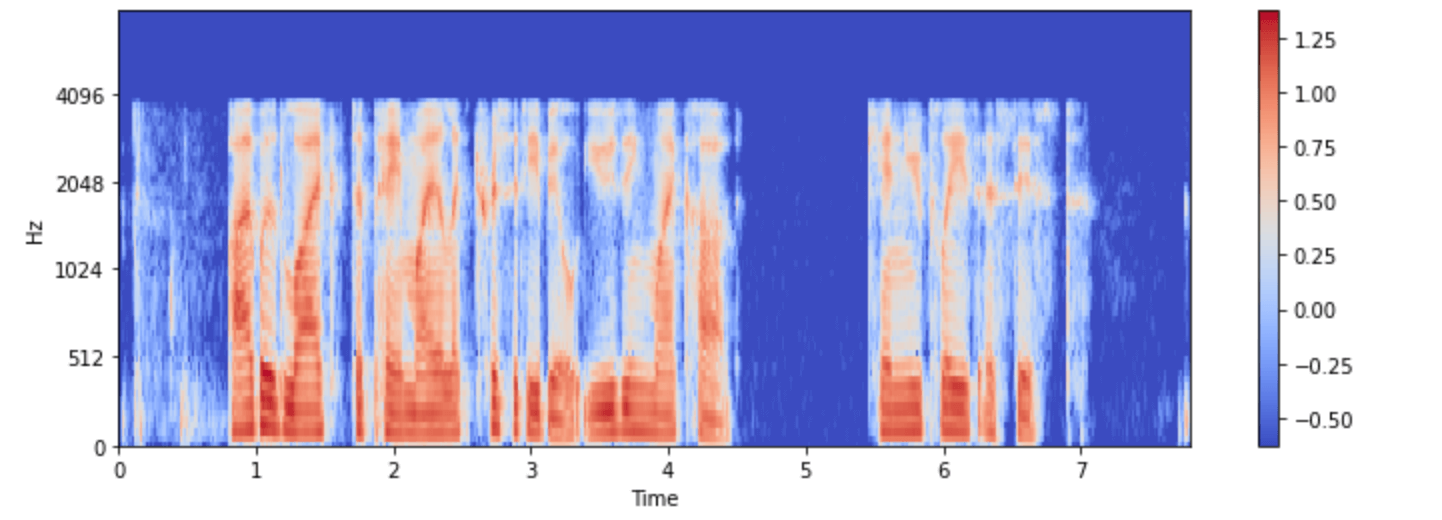
现在我们有了 log-mel 频谱作为输入
再次可视化一下:
import numpy as np

example = minds[0]
input_features = example["input_features"]

plt.figure().set_figwidth(12)
librosa.display.specshow(
    np.asarray(input_features[0]),
    x_axis="time",
    y_axis="mel",
    sr=feature_extractor.sampling_rate,
    hop_length=feature_extractor.hop_length,
)
plt.colorbar()
大部分任务是多模态的,transformers 同样提供model-specific tokenizers 加载文本输入。
你可以分别加载,或者通过 processor 一块加载。为了简化,使用 AutoProcessor 从 checkpoint 加载模型特征和 processor
from transformers import AutoProcessor

processor = AutoProcessor.from_pretrained("openai/whisper-small")
流音频
之前的音频都太小了,多的几十G的基本得靠流模式处理。因为
- 节省空间
- 加快时间
- 容易实验
举例:
gigaspeech = load_dataset("speechcolab/gigaspeech", "xs", streaming=True)
以下是流式传输数据集时访问示例的方法:
next(iter(gigaspeech["train"]))
输出
{
    "segment_id": "YOU0000000315_S0000660",
    "speaker": "N/A",
    "text": "AS THEY'RE LEAVING <COMMA> CAN KASH PULL ZAHRA ASIDE REALLY QUICKLY <QUESTIONMARK>",
    "audio": {
        "path": "xs_chunks_0000/YOU0000000315_S0000660.wav",
        "array": array(
            [0.0005188, 0.00085449, 0.00012207, ..., 0.00125122, 0.00076294, 0.00036621]
        ),
        "sampling_rate": 16000,
    },
    "begin_time": 2941.89,
    "end_time": 2945.07,
    "audio_id": "YOU0000000315",
    "title": "Return to Vasselheim | Critical Role: VOX MACHINA | Episode 43",
    "url": "https://www.youtube.com/watch?v=zr2n1fLVasU",
    "source": 2,
    "category": 24,
    "original_full_path": "audio/youtube/P0004/YOU0000000315.opus",
}
使用 take() 获取前几个元素
gigaspeech_head = gigaspeech["train"].take(2)
list(gigaspeech_head)
输出
[
    {
        "segment_id": "YOU0000000315_S0000660",
        "speaker": "N/A",
        "text": "AS THEY'RE LEAVING <COMMA> CAN KASH PULL ZAHRA ASIDE REALLY QUICKLY <QUESTIONMARK>",
        "audio": {
            "path": "xs_chunks_0000/YOU0000000315_S0000660.wav",
            "array": array(
                [
                    0.0005188,
                    0.00085449,
                    0.00012207,
                    ...,
                    0.00125122,
                    0.00076294,
                    0.00036621,
                ]
            ),
            "sampling_rate": 16000,
        },
        "begin_time": 2941.89,
        "end_time": 2945.07,
        "audio_id": "YOU0000000315",
        "title": "Return to Vasselheim | Critical Role: VOX MACHINA | Episode 43",
        "url": "https://www.youtube.com/watch?v=zr2n1fLVasU",
        "source": 2,
        "category": 24,
        "original_full_path": "audio/youtube/P0004/YOU0000000315.opus",
    },
    {
        "segment_id": "AUD0000001043_S0000775",
        "speaker": "N/A",
        "text": "SIX TOMATOES <PERIOD>",
        "audio": {
            "path": "xs_chunks_0000/AUD0000001043_S0000775.wav",
            "array": array(
                [
                    1.43432617e-03,
                    1.37329102e-03,
                    1.31225586e-03,
                    ...,
                    -6.10351562e-05,
                    -1.22070312e-04,
                    -1.83105469e-04,
                ]
            ),
            "sampling_rate": 16000,
        },
        "begin_time": 3673.96,
        "end_time": 3675.26,
        "audio_id": "AUD0000001043",
        "title": "Asteroid of Fear",
        "url": "http//www.archive.org/download/asteroid_of_fear_1012_librivox/asteroid_of_fear_1012_librivox_64kb_mp3.zip",
        "source": 0,
        "category": 28,
        "original_full_path": "audio/audiobook/P0011/AUD0000001043.opus",
    },
]